If you are preparing for HackerRank for interviews, you’ll be stressed about this question: “Does HackerRank record screen?” However, it is not simply a “yes” or “no” in 2026. Meanwhile, it is important to know how this platform tracks you when you are taking a job test at a big tech company.
Similarly, you should know it in detail before working on an academic project. Instead, it depends on the setting that the employer makes. Thus, it should be noted that HackerRank can fully record what you do on your computer, webcam, and browser. Moreover, let’s find out its detailed tracking system in this blog!
What is HackerRank Test?
HackerRank tests are online coding tests that most companies use for hiring purposes. Thus, people who are looking for work must pass it. First of all, when you apply for a job, you’ll get an email from the company. You’ll then get a test link from the company.
Thus, when you click on the link and have a specific time to solve one or more coding questions. Your answers are checked automatically, and you are given a score. Thus, the company will ask you to come in for another interview if you do well on the first one. In short, it is a quick way to shortlist the qualified candidates.
Free Price Calculator
Get to know about Daniel:
- For smooth communication I use WhatsApp; Contact me on WhatsApp
- Each Client has a separate WhatsApp group
- Watch videos of me taking real exams: Quora Space
- How my most popular WhatsApp method works: Daniel WhatsApp Method
- I am Ranked #1 tutor on YouTube, Check out my YouTube Channel
- I keep my Clients info highly confidential by encrypting your name to a 4-digit code
- Get discounts on your next orders by suggesting me to your friends
Does HackerRank Record Screen?
Here is a one-word answer: “Yes”. But only when “Proctor Mode” or “Secure Mode” is turned on.
In short, the recording is not used in all tests. For example, you don’t usually need a video for a simple practice test. On the other hand, a final-round interview for a big company will certainly need it. However, let’s know more about its monitoring below!
Detailed Breakdown of 3 Monitoring Types in 2026
Enabling the screen recording is only one part of the puzzle. In 2026, there are three main types of monitoring. Here is a detailed review of them:
- Screen Recording
Screen recording comes to mind when people ask, “What does HackerRank track?” However, HackerRank doesn’t always record what’s on your screen. But if a boss turns on “Secure Mode” or “Proctored Mode,” screen recording starts by itself.
How Does HackerRank Record Your Screen?
First, the system checks to see if you have more than one monitor linked. Thus, it may ask you to unplug the extra monitor if you do that. Otherwise, the test may not start. The platform also uses a technique known as “focus locking.” If you try to click outside the test window, the screen will flash a warning instead of letting you go.
Therefore, opening a second browser window or a notepad with pre-written code will always cause an alert.
- Webcam & Camera Recording
When students ask, ” Does HackerRank use cameras?” The straight and simple answer is “Yes”. In fact, the camera is one of the most powerful tools to monitor students in 2026.
How does HackerRank detect cheating?
Every 30 to 60 seconds, the camera takes a picture of your face. This “HackerRank in session photo capture” means your pictures are kept and will be reviewed if any strange behavior is found.
The AI also watches how your eyes move. Plus, it looks at the background of every picture. If there is even a small amount of a second face in the frame, the test is quickly marked as failed. Finally, the webcam looks for shiny surfaces like a phone screen on your lap or desk. Thus, beyond just asking about “Does HackerRank record screen?”, you have to take care of every monitoring feature.
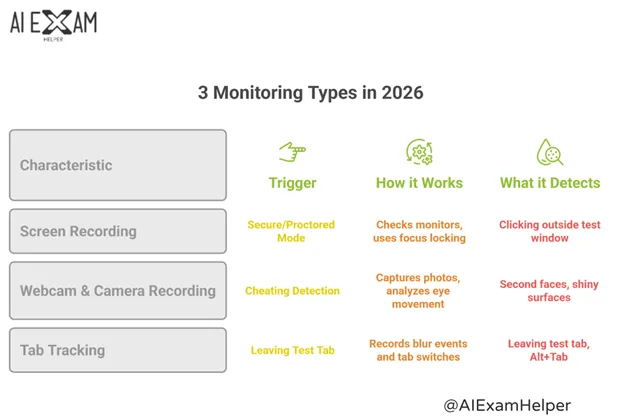
- Tab Tracking
It is a very commonly asked question: “Can HackerRank see other tabs?” So, the platform technically cannot read what’s in your other tabs because browsers are set up with a strict privacy policy. On the other hand, it can tell that you left the test tab.
How can HackerRank see if you switch tabs?
Once you leave the test window and click on something else, your browser sends a “blur” event to HackerRank’s servers. This event has a timestamp and tells you how long you were away.
Plus, the event is also recorded as a “tab switch” when you press Alt+Tab (Windows) or Cmd+Tab (Mac).
Meanwhile, the proctor will automatically be notified. After that, they could look at the video from that exact moment. It is also a loss of focus if you click on an operating system notification pop-up by chance, like one that says “battery low.” So, it is best to end all other apps before starting your exam.
How HackerRank Proctoring Works to Catch Cheaters in 2026?
If you hide a second computer, you might think you are smart. But the system isn’t just looking at screenshots; it is looking for suspicious patterns of behavior. Therefore, knowing about “Does HackerRank record screen” is not enough in 2026. So, let’s dive in to know more!
ChatGPT & AI Cheating Detection
Most students and professionals search on Google, “Can HackerRank detect ChatGPT?” The answer is yes. But not in the way you might think. The proctoring system doesn’t look for ChatGPT by name.
Instead, it looks for signs that show your answer is not human-written. Thus, it clearly shows AI-generated text. Meanwhile, here are three main ways to find ChatGPT:
- Paste Detection
There is a log that is kept every time you paste. Second, any paste with more than 10–15 lines is marked. Lastly, it checks the code you copied against your usual style. If you paste a perfect answer all of a sudden, the system thinks you are cheating.
- Insertion Speed Analysis
First, the device checks how fast you are typing each character. Meanwhile, it knows that people type slowly and with breaks. So, when you paste from ChatGPT, the whole text shows up right away. So, the fact that there are no mistakes or breaks makes this instant speed a huge red flag.
- Code Style Mismatch
Your early answers are used to create a coding fingerprint. For instance, it learns how you usually name things and what mistakes you make. If you suddenly use complicated syntax in one answer that you haven’t used before, the system will mark it as a mismatch. In short, getting a straight “yes” or “no” about the question “Does HackerRank record screen” is not enough anymore. Because AI is monitoring your every single task.
Example of Detecting ChatGPT
Let’s say you have trouble writing a simple “for loop” in Question 1. It takes 90 seconds and three mistakes. After that, in Question 5, you quickly pasted a recursive formula that worked perfectly and had no mistakes. Because of this, HackerRank thinks ChatGPT or another AI was used, even if you just copied and pasted the text.
Keystroke Dynamics
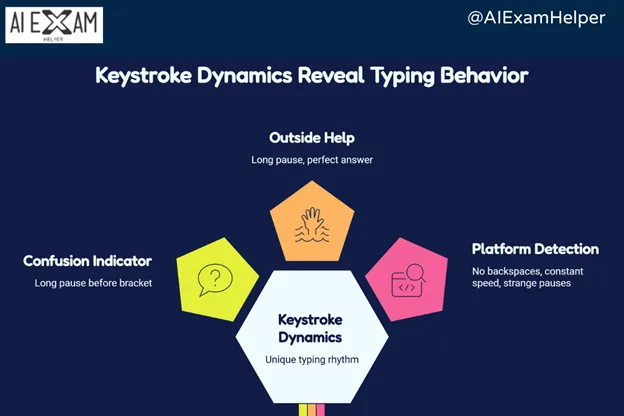
Keystroke dynamics are the different ways that people type. Just like a fingerprint, your typing rhythm is surprisingly tough to fake. Moreover, real people automatically pause to think as they write code. They also misspell words, delete characters, retype lines, and pause between tasks. Because of this, the time between keystrokes is always changing.
Moreover, if you are pausing for a long time before writing an ending bracket, its mean that you are confused. On the other hand, a long pause followed by a perfect 10-line answer points to outside help. Meanwhile, here are the three specific things that the platform looks for:
- No backspaces at all: People make mistakes. It’s not normal for 50 or more lines to have no changes.
- Perfect constant speed: A robotic typing rhythm with high speed rarely happens naturally.
- Strange placement of pauses: It doesn’t make sense to stop before simple syntax like a semicolon, but rush through complex logic.
Focus Tracking
This log tracks whether the test window is open or closed. Thus, it is all about active vs. idle time. The system keeps track of how many seconds you spend in and out of the test window.
Also, if you click on a different window and then come back to the test, the system records exactly where your mouse was before and after the move. For instance, if you are using a chat app or email while the test is going on is seen as a red flag.
What is HackerRank CodePair?
You should also understand HackerRank CodePair. This tool is made for in-person talks, not tests that you can take at home. Thus, people get confused and ask, “Does HackerRank record screens during a CodePair session?” In most cases, yes, but not always. Thus, the interviewer can ask to see your screen at any time. Usually, the interviewer has to permit you to share the screen on HackerRank first.
Why HackerRank is the Industry Standard?
HackerRank is the best on the market. According to official platform data, it has a large number of code questions and a 93% accurate plagiarism detection model. Thus, companies like IBM depend on it because the HackerRank proctoring system effectively filters out dishonest applicants. Thus, it saves over 60% of recruiters’ time on false candidates.
Meet Daniel – Your Exam Solution at AI Exam Helper
It can be stressful to figure out how to use complicated online tests and proctoring software.
If you are the one who is anxious about the nearby deadline and complex codes, then meet Daniel. He can help you with your hardest exam at AI Exam Helper.
He has been bypassing the trackers and solving hard tasks with years of experience. Plus, he helps students get better grades by helping them with their homework, online classes, and the whole course. So, here is what he gives you:
- Full exam takeover
- The latest and most advanced tools to get around proctored platforms
- Complete help for HackerRank Java
Moreover, here is why he is the first choice of everyone:
- Guaranteed Results
- 100% Privacy
- Stress-free Experience
- 24/7 Availability
The Bottom Line
So, does HackerRank record screens? Yes, but only if the proctoring feature is on. However, recording your screen is only one tool. The platform also looks for ChatGPT answers, watches your camera, and keeps track of your tabs and how you write. In 2026, it is almost impossible to cheat because of this.
Thus, you should get professional help instead of trying traditional risky tricks. Don’t worry if you feel stuck or stressed, though. Daniel at AI Exam Helper can help you through his high-tech AI software and professional tricks. So, get his help right away to ace your test without stress.
FAQs
Does HackerRank record screen IBM?
Yes, IBM uses the full corporate proctoring suite, which includes recording your screen. So, it is very difficult to bypass it.
Can HackerRank detect screen sharing?
The system can tell if you have an external monitor connected. There is a chance that the CodePair interviewer will see if you try to share your screen without permission.
Does Coderpad record screens?
Not at all. Coderpad is lighter than HackerRank and doesn’t have webcam or screen recording options.
Does HackerRank record screenshots without permission?
Not at all. HackerRank does not take a screenshot without your approval. Before the video starts, the web browser will always ask to share your screen. However, if you do not give permission, then the test will not start.