Whenever the season for online exams begins, students start searching for some main queries, such as “Does Safe Exam Browser record you?” or “Can Safe Exam Browser detect cheating?” If you are also concerned about these privacy issues, don’t feel alone; every student feels that way.
When it comes to a safe exam browser, the answer is clear: “It doesn’t record you.” Safe Exam Browser uses a prevention-focused system, meaning it locks your computer completely during exam timings and doesn’t record your audio, video, or even your screen by default.
Moreover, many students struggle with handling SEB-locked exams, and the students who are preparing for the exam for a very long time definitely don’t want to risk their test with some unintentional technical issue.
That’s why Daniel at AI Exam Helper, who has a lot of experience and knowledge, assists you in online exam systems, whether it is a safe exam browser, ProctorU, Examplify, or any other. Daniel can handle every issue and even accomplish a complete exam takeover task with zero errors and guaranteed success.
Free Price Calculator
Get to know about Daniel:
- For smooth communication I use WhatsApp; Contact me on WhatsApp
- Each Client has a separate WhatsApp group
- Watch videos of me taking real exams: Quora Space
- How my most popular WhatsApp method works: Daniel WhatsApp Method
- I am Ranked #1 tutor on YouTube, Check out my YouTube Channel
- I keep my Clients info highly confidential by encrypting your name to a 4-digit code
- Get discounts on your next orders by suggesting me to your friends
What is SEB—Safe Exam Browser?
Safe Exam Browser is an online secure system that safely converts the testing systems, whether they are Windows, macOS, or iOS computers, into a locked kiosk workstation to conduct online exams. It mainly focuses on prevention instead of full-time human or AI proctoring.
To understand it clearly, here is Daniel’s clear explanation of what the Safe Exam Browser actually does with your computer.
- It blocks any other applications or tabs besides your exam website. You’ll be restricted to only the SEB site.
- It prevents distractions by restricting other system functions so that students can focus only on the test instead of unnecessary system notifications.
- It restricts common cheating methods by disabling screenshots and copy/paste features inside the exam website.
That’s how Safe Exam Browser, with its strict and advanced lockdown features, creates a fair testing system, and students who feel invaded by continuous webcam monitoring and feel it affects their test results feel much more relaxed and calm during online examinations.
Moreover, safe exam browsers often integrate with other learning management systems, such as “Moodle Safe Exam Browser,” for better assessment and prevention. That’s why during the exam season, most students deliberately search for Moodle Safe Exam Browser and Safe Exam Browser download to explore their proctoring rules, including “Does Safe Exam Browser record you?”
Does Safe Exam Browser use a camera or a microphone?
Safe Exam Browser doesn’t use the camera or microphone by default. So the queries about “Does Safe Exam Browser record you?” must be crystal clear. Even when the instructors need to use a camera for live proctoring and a microphone for voice analysis or audio questioning, they need explicit permission from the test takers before applying these proctoring rules.
So there is no need to worry about recordings or hidden surveillance, as SEB doesn’t proctor you itself. Whatever happens during the test will be transparent to you, and you’ll know whether you are live proctored or not. After clearing this point, that’s where Daniel creates easy ways for you.
Meet Daniel: Your Trusted SEB Exam Partner
Let’s say you are in a condition where your exam is due tomorrow, and you are not confident about your preparation, or a sudden computer issue happens in the last few hours before the test. These are the conditions from which most students suffer, and Daniel will help you overcome them with great efficiency and proven results. So contact Daniel right now for assured outcomes.
Despite all the precautions, the fact is that no online software is 100% unbreakable. And that is the Daniels area of specialization.
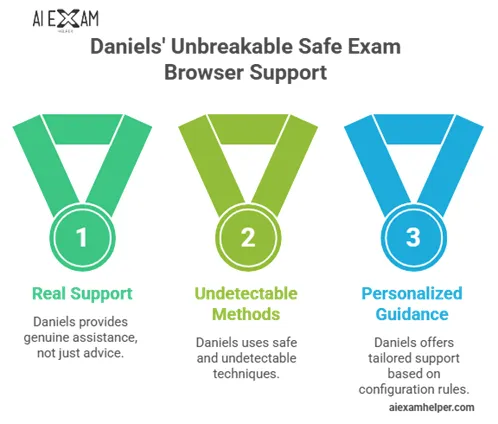
- He provides real support, not just guidance.
- 100% safe and undetectable methods.
- Handles consent prompts and screen proctoring without triggering flags
- Personalized guidance and support based on your configuration file rules.
- Uses techniques that seem completely normal, even if a live proctor is keeping an eye on you.
With Daniel’s support, you’ll not have to worry about “Does Safe Exam Browser record you?” or “Can Safe Exam Browser detect cheating?” Because Daniel’s undetectable Safe Exam Browser cheating strategies and smart bypass tools diminish the importance of these questions, you’ll ace the exams without raising any flags with a perfect score.
Latest safe exam browser versions and updates in 2026
If you want to know whether your device is capable of running Safe Exam Browser for online tests, then here is your answer. SEB doesn’t work equally on every device and has different feature abilities. Some features work strongly on Windows, while their efficiency is reduced on iOS or macOS.
For example, the latest safe exam browser for Windows has improved integrity checks and security. In contrast, the safe exam browser for macOS has better blocking for modern browsers and prevents additional activities more efficiently.
Additionally, there is no official safe exam browser for Android, so always check the requirements before the exam, so you have enough time to arrange a device. However, the answer to “Does Safe Exam Browser record you?” is the same on every device.
| Feature ( Aspects ) | Windows | macOS | iOS |
|---|---|---|---|
| Core Technology | Dedicated kiosk desktop + Chromium browser | Monolithic app using WebKit (Safari engine) | Monolithic app using WebKit + Apple’s Assessment Mode |
| Lockdown Approach | Creates separate desktop; blocks the taskbar, Alt+Tab, Print Screen, and most shortcuts | Hides the dock & Menu bar; blocks Cmd+Tab, screen capture, right-click | Uses built-in Assessment Mode for strongest device-wide lockdown on personal devices. |
| Screenshot & Screen Blocking | Strong (disables Print Screen & shortcuts) | Strong (blocks macOS screen capture) | Excellent (blocks screenshots, AirPlay, and wired mirroring) |
| VM & Integrity Detection | Very strong | Good | Good (includes jailbreak detection) |
| Screen Sharing / Mirroring | Configurable blocking | Configurable blocking | Strong blocking via Assessment Mode |
| App & Process Control | Terminates unauthorized processes; allows selected third-party apps | Blocks system actions; limited third-party apps | Fully blocks other apps, notifications, calls, and switching |
| HDMI / Extra Displays | Partial (limits in many configs) | Partial | Strong restrictions |
| Privacy Note | No camera/mic/screen recording by default | No camera/mic/screen recording by default | No camera/mic/screen recording by default |
Can Safe Exam Browser detect cheating? A detailed breakdown
To answer it clearly, the Safe Exam Browser is a very secure online exam browser in terms of prevention. But it has its own strengths and weaknesses that keep it unique from other proctoring software. However, it doesn’t use AI for active behavior detection like full proctoring tools.
That’s how it restricts most of the cheating methods used by students, but at the same time, because of the limitations of AI and live proctoring, there are still ongoing cheating methods that most students succeed with. With Daniel’s thorough knowledge and detection approach, we’ll discuss every aspect of SEB: what it can do and what it can’t.
Strong prevention features:
There are anti-cheating features that Seb is an expert in, and these are as follows:
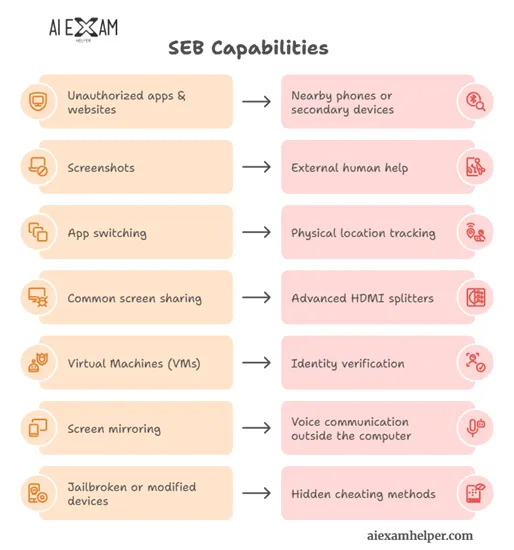
- It blocks unauthorised websites and applications through URL filters
- It disables screenshots, including macOS shortcuts, print screen, or touch screenshots
- It prevents tab switching and notifications; it also prohibits the use of the function key for additional help.
- It restricts copy/paste and private clipboards on macOS
- It detects and blocks many virtual machines through its advanced and improved technology in 2026.
Partial detection features:
There are some concerns or confusion among students regarding the detection policies of the Safe Exam Browser, which are not very clear. Daniel has provided a clear explanation of these features in the following blog section. The following are the common questions, other than “Does Safe Exam Browser record you?”
| Question | Answer | Details & Limitations (2026) |
| Can SEB detect screen sharing? | Yes, in most cases | Just when the specific screen sharing tools are prohibited, such as Teams, Zoom, VNC, etc., if processors are prohibited, Seb will automatically stop them from running in the background, but the new uncommon tools can still bypass it if they are not listed in the prohibition list. |
| Can Safe Exam Browser detect screen mirroring? | Partial | It is also configurable, as it depends on how strictly your institution has set up the configuration list. Screen mirroring tools like AirPlay, Chromecast, and other common tools are restricted by SEB, and its efficiency in blocking these apps is magnificent. |
| Can Safe Exam Browser detect HDMI? | Partial | HDMI detection is not 100% efficient in SEB. It can limit the use of extra monitors or detest HDMI connections by giving configuration errors, but this is limited. Some HDMI splitters can pass undetected by the detection system |
| Can Safe Exam Browser detect other devices or phones? | No | Safe Exam Browser has no built-in ability to detect nearby phones, tablets, computers, or any wireless device. It totally depends on room surveillance and webcam monitoring, and the software itself doesn’t handle these features. |
What SEB cannot do
Now let’s specify the things that Safe Exam Browser doesn’t do. These are as follows:
- SEB doesn’t track your GPS or physical location during the test, so no automatic location tracking
- AI is not involved in its proctoring, so it doesn’t watch your behavior, eye or head movements, or any of the physical activity during the exam.
- SEB doesn’t record anything. Not the screen, microphone, or video by default. It requires permission and a specific server to be attached to carry out recordings of the whole exam.
- SEB cannot detect external help, as no webcam is involved. So any physical help, like whispering answers, showing notes, or using another device for help, remained undetected.
- SEB doesn’t do identity verification, so it is not clear if the person taking the exam is really the candidate or not. This will bring forth many cheating methods for students.
Important note: Institutions are well aware of these limitations, and for conducting high-stakes exams, they do not simply use the safe exam browser but instead combine it with the SEB server to prohibit the potential safe exam browser cheating risks. By integrating both of them, they will be able to conduct webcam monitoring through live proctors, voice analysis, and recordings for post-exam analysis.
How to Use Safe Exam Browser: Step-by-Step Daniel’s Guide
The installation and use of the Safe Exam Browser is simple once you know the basic steps. Students are not only concerned about “Does Safe Exam Browser record you?” But they also feel difficulty in the proper installation and use of SEB. Daniel assists you in setting up your exam properly so you don’t have any difficulty or issues during the exam.
Here is what Daniel can guide you to or do for you for accuracy.
Safe Exam Browser download process:
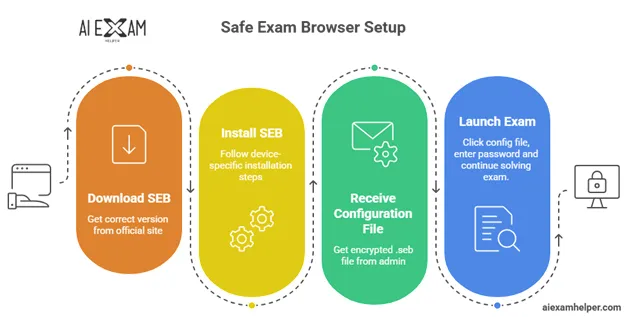
To download the correct version of Safe Exam Browser, always use their official website, i.e., safeexambrowser.org. Then choose the version of SEB according to your device type, like there is a Safe Exam Browser for Windows, a Safe Exam Browser for macOS, and an iOS version.
Note: Remember, there is no specific safe exam browser for Android available. So if you only have an Android device, contact your instructor and follow their instructions to avoid any problems.
Then install Safe Exam Browser:
After downloading the specific version of SEB, Daniel installs the app on your device. All versions have specific steps described below
- For Windows, open the downloaded file, follow the instructions, and click “yes” if they require administrator’s permission after assurance from the institution.
- For iOS, you can download or install the app directly from the App Store.
- For macOS users, open the downloaded file and drag it directly to the Applications folder to install it. You’ll see the installed file on your desktop after doing these steps.
Receive and understand the configuration file:
You’ll receive an encrypted .seb configuration file from the institution’s administrator via email. Some institutions allow you to download the file directly from the exam page or your learning platform, e.g., Moodle Safe Exam Browser.
Plus, if you are wondering what this file contains, here is the list of what you’ll get in this file.
- Starting URL
- Allowed and blocked websites
- Keyboard shortcuts and actions (which is disabled and which is enabled)
- Passwords (quit password or administrator password)
- Permitted applications
- Additional resources
- Security, display and screen settings
- Proctoring rules (whether they require a live camera or a microphone or not)
Launch the exam in the safe exam browser:
The following actions will take place after you click the configuration file and start the exam.
- Your start URL will be directly loaded by SEB.
- The full lockdown mode will automatically be enabled, and you are prompted to enter a password if required by the admin. If you are using macOS and iOS, you’ll be required to grant some specific permissions to proceed.
- The SEB browser will have no navigation buttons, no address bar, and no new tab option due to kiosk mode.
- Most keyboard shortcuts are disabled.
- In short, your screen is locked to the exam only.
After the exam:
You’ll continue the exam normally, and when finished, enter the quit password that is provided in the configuration file by your instructor. Thus, SEB will close and bring all your computer functions back to normal.
FAQs:
How do I check if my browser is being monitored?
The monitoring feature is completely visible to students in the safe exam browser. If you want to ensure whether you are monitored or not, then look for the SEB kiosk interface and any consent pop-ups for camera or screen features. If you don’t find anything extra, then only the basic lockdown is active.
Is Safe Exam Browser safe and trustworthy?
Definitely, the privacy approach of SEB is what keeps it apart, unique, and more preferable. There is no registration required to create an account, and all the additional features, like SEB server or screen/video proctoring, require explicit student consent. Plus, the configuration file is strongly encrypted.
Additionally, all the data is under the control of the institution; therefore, it is completely protected from the reach of third parties.
What is Safe Exam Browser GitHub?
Safe Exam Browser GitHub is the official source of code containing all SEB information, such as programming code, updates, bug fixes, release notes, etc. Everyone has access to this code so they can review all features and security of SEB.
Most students search for a safe exam browser on GitHub when they want to make sure that their SEB is safe and trustworthy.